Quick Navigation
- 0 Before You Start: Understand the components, choose your path, and prepare your environment
- 1 Install GsCore: Install the core, the Wuthering Waves plugin, and set up background operation
- 2 Install NapCatQQ: Personal QQ protocol endpoint
- 3 Install NoneBot2: Personal QQ or official QQ bot route
- 4 Install AstrBot: Personal QQ and LLM route
- 5 Extended Tutorials
- 6 XutheringWavesUID FAQ
0 Before You Start
Xiaowei asked me why I built the greenhouse. I said it was for her. That was true — but not the whole story. The greenhouse was also for myself. Before I built it, I was just a cookie scattered in the corner.
— Xiaowei151
0-1 Preface
Before diving into setting up this powerful and complex bot architecture, let's first clarify the roles of each component and the deployment paths available to you. It's strongly recommended that you read this entire document from start to finish before you actually start typing terminal commands. Getting a conceptual grasp of the overall flow first will help you avoid most configuration pitfalls.
If you run into trouble during deployment, try feeding this article to an AI.
Also:
0-1-1 Component Overview
To build this system, we'll use the following core open-source projects:
- GsCore (GenshinUID Core): A highly modular, multi-platform framework for game data queries and interactions. It comes with a built-in web console and several game plugins, handling core business logic like fetching game data (e.g., Wuthering Waves, Genshin Impact), rendering panels, and daily check-ins.
- NapCatQQ: A QQ protocol implementation based on NTQQ. It can run in Shell Mode (ideal for headless servers) or Framework Mode (injecting into the QQ client). Its main job is to log into your QQ account, act as the underlying protocol layer, reliably handle sending and receiving messages, and expose them to the upper-level bot framework via standard protocols (like OneBot V11).
- NoneBot2: A modern, cross-platform, asynchronous Python chatbot framework. It has a vast ecosystem and supports a huge number of plugins, making it an excellent middleware to connect the underlying protocol layer (like NapCat or the official QQ API) with the business logic layer (like GsCore).
- AstrBot: A multi-platform large language model chatbot framework that supports visual configuration and is ready to use out of the box. Not only does it offer a great LLM integration experience, but it can also elegantly integrate GsCore's game data capabilities through specific adapter plugins (e.g.,
astrbot_plugin_gscore_adapter), making it suitable for lightweight deployments.
0-1-2 Deployment Route Guide
Depending on your use case and the type of QQ you're using, the following three manual deployment combinations are provided. Choose the corresponding chapter based on your actual needs.
| Use Case | Recommended Combination | Reading Order |
|---|---|---|
| Personal QQ, prefers visual management & LLM | GsCore + NapCat + AstrBot | Chapter 1 → Chapter 2 → Chapter 4 |
| Personal QQ, needs NoneBot plugin ecosystem | GsCore + NapCat + NoneBot2 | Chapter 1 → Chapter 2 → Chapter 3 |
| Official QQ Bot | GsCore + NoneBot2 + QQ Official API | Chapter 1 → Chapter 3 |
Route 1: Personal QQ ("Wild") Express Route
If you plan to use your own QQ sub-account to run the bot and prefer an intuitive management panel with a clean deployment logic, this route is recommended.
- Architecture Flow:
GsCore ↔ AstrBot ↔ NapCatQQ ↔ QQ Client - Implementation Logic: NapCatQQ handles logging into the personal QQ account and converts messages into network protocols. AstrBot acts as the central brain, receiving messages and forwarding game-related commands to GsCore via the adapter. GsCore generates images and sends them back to the user along the same path.
Route 2: Official QQ Bot / NoneBot Advanced Route
If you are using an official bot registered through the QQ Open Platform, or if you heavily rely on NoneBot2's vast plugin ecosystem, this route is recommended.
- Architecture Flow:
GsCore ↔ NoneBot2 ↔ QQ Official API (or NapCat) ↔ QQ Client - Implementation Logic: NoneBot2 acts as a bridge. On one side, it connects to the official API via
NoneBot-Adapter-QQ(or to NapCat via the OneBot protocol). On the other side, it establishes WebSocket communication with GsCore vianonebot-plugin-genshinuid, thereby enabling functionality.
If you want to quickly deploy using Docker Compose and don't want to manually install GsCore, NapCat, and AstrBot one by one, you can use my NAG One-Click Script. This article will still focus on manual deployment.
0-1-3 Common Ports Quick Reference
| Port | Service | Main Purpose | Usually Needs Public Exposure? |
|---|---|---|---|
6099 | NapCat | WebUI | No, SSH tunnel recommended |
6185 | AstrBot | WebUI | No, SSH tunnel recommended |
6199 | AstrBot | Receives OneBot Reverse WebSocket from NapCat | No, communication within the same machine or container network |
8080 | NoneBot2 | Receives OneBot Reverse WebSocket from NapCat | No, communication within the same machine or container network |
8765 | GsCore | WebUI and framework connection | No, SSH tunnel or reverse proxy recommended |
0-2 Preparation
The following guide uses /root/bot as the example directory. If you are not the root user, replace all instances of /root/bot with your actual path (e.g., ~/bot).
# Create the main directory
mkdir -p /root/bot && cd /root/bot

# Install basic dependencies
sudo apt update
sudo apt install -y python3 python3-pip python3-venv python3-tk git curl wget
1 Install GsCore
This chapter is the common foundation for all routes. After completing the GsCore and Wuthering Waves plugin installation, proceed to Chapter 2, 3, or 4 based on your chosen route.
1-1 Install uv
Choose one of the three methods below; the official script or pipx method is recommended.
1-1-1 Install using pip
pip install uv --break-system-packages

# Or install within a virtual environment

# Create a virtual environment
python3 -m venv venv

# Activate the virtual environment
source venv/bin/activate

# Install uv
pip install uv

# Deactivate the virtual environment
deactivate
1-1-2 Install using pipx
# Install pipx
sudo apt install -y pipx
pipx ensurepath

# Reopen the terminal; or run the following to make it effective immediately
exec $SHELL

# Install uv
pipx install uv
1-1-3 Install using the official script
curl -LsSf https://astral.sh/uv/install.sh | sh

# If your system doesn't have curl, use wget
wget -qO- https://astral.sh/uv/install.sh | sh
1-2 Clone the Core
git clone https://github.com/Genshin-bots/gsuid_core.git --depth=1 --single-branch
cd gsuid_core
1-3 Install Dependencies
# Recommended method
uv python install 3.13
uv sync --python 3.13
uv run python -m ensurepip

# If your current Python version already meets the requirements, you can also use:
# uv venv --seed
# uv sync
GsCore currently requires Python >=3.11,<4.0. Using Python 3.13 here is a recommended example within the compatible range.
1-4 First Launch
uv run core
Web Console
- On first launch,
gsuid_core/data/config.jsonandgsuid_core/data/core_config.jsonare automatically generated. - The default web console address is
http://127.0.0.1:8765/app. - You need to register when first entering the console. The registration code is located in the
REGISTER_CODEfield ofgsuid_core/data/config.json.
Configuration Items to Prioritize
masters: Your QQ number / platform account. It's recommended to fill this in as soon as possible, otherwise some Core management commands won't work properly.WS_TOKEN: Recommended to fill in. If filled, you need to configure this Token synchronously in the corresponding adapter. If GsCore and the connecting Bot are on the same machine, it's usually not needed; but if they are on the same machine but across Docker, it is also required.HOST: Default islocalhost. If you need to access it via a reverse proxy or from another device, change it to0.0.0.0.TRUSTED_IPS: If you don't fill inWS_TOKEN, only trusted IPs (usually127.0.0.1) are trusted by default.
External Access Methods
- Change
HOSTto0.0.0.0ingsuid_core/data/config.json. - Or modify the "Service Listening Address" in the console and restart.
- Or directly reverse proxy
http://127.0.0.1:8765.
0.0.0.0 only means listening on all network interfaces, it does not mean securely exposing to the public internet. It is recommended to configure WS_TOKEN simultaneously, and prioritize using SSH port forwarding or a reverse proxy with HTTPS and authentication, rather than directly exposing port 8765.
You can add the following configuration to your reverse proxy so that example.com automatically redirects to the console instead of example.com/app:
location = / {
    return 301 /app/;
}
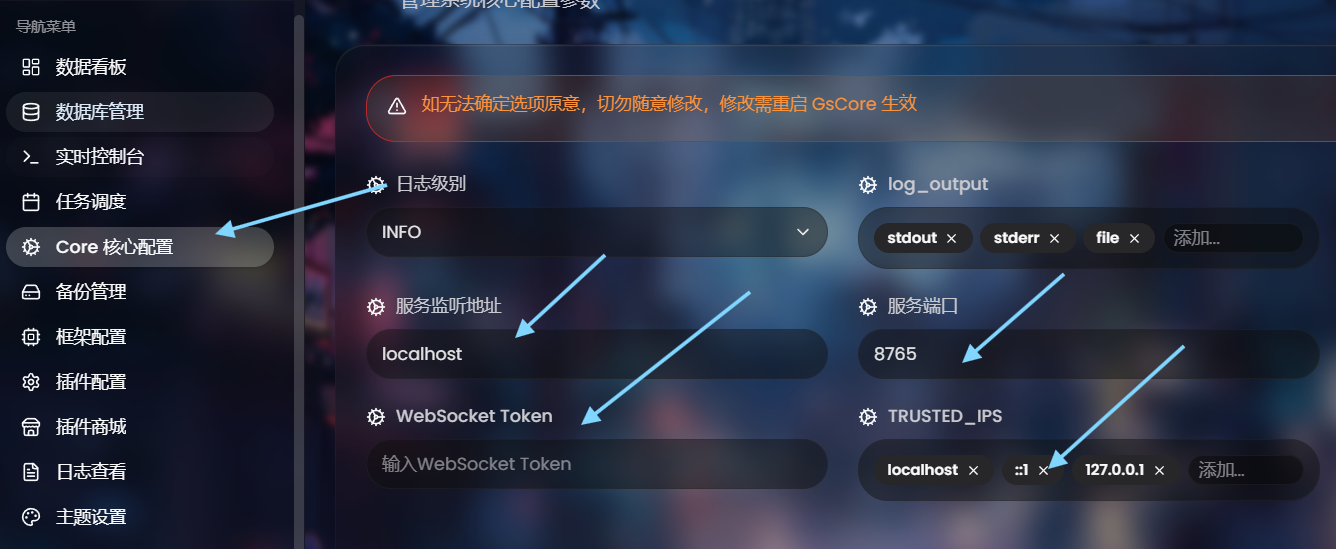
Modifying WS_TOKEN, TRUSTED_IPS, and HOST
Additionally, you can use Docker for quick deployment.
1-5 Install the Wuthering Waves Plugin XutheringWavesUID
cd /root/bot/gsuid_core/gsuid_core/plugins/
git clone https://github.com/Loping151/XutheringWavesUID.git --depth=1

# Restart GsCore
cd /root/bot/gsuid_core
uv run core
You can also send core install plugin XutheringWavesUID to the bot after configuring everything, then restart the core to apply the installation.
When weight and damage calculation updates are available, simply send ww download all resources to automatically reload.
It is recommended to install the following additional dependencies:
playwright: Used for rendering announcements, wiki images, etc. After installation, you also need to runuv run playwright install chromium.opencv-python: Used for duplicate panel image detection, panel image extraction, similarity recognition, etc.fonttools: Used for multilingual font fallback. Without it, Japanese and Korean characters may display as boxes.pypinyin: Used for fuzzy suggestions and pinyin error tolerance.rapidfuzz: Works withpypinyinto speed up fuzzy matching.
The Core usually automatically installs missing Python packages based on the plugin's pyproject.toml at startup. If the log indicates an installation failure, manually execute the command below. Even if the Python packages are installed automatically, Chromium still needs to be installed manually once.
# Linux/Mac
source .venv/bin/activate && uv pip install playwright opencv-python fonttools pypinyin rapidfuzz && uv run playwright install chromium
# Windows
.venv\Scripts\activate; uv pip install playwright opencv-python fonttools pypinyin rapidfuzz; uv run playwright install chromium
1-6 Background Operation and Persistence
1-6-1 systemd
Create /etc/systemd/system/gscore.service and write the following basic content:
[Unit]
Description=GsCore
Wants=network-online.target
After=network-online.target

[Service]
# Domestic mirror source
# Environment="UV_INDEX_URL=https://pypi.tuna.tsinghua.edu.cn/simple"
Type=simple

# Change to your own GsCore path
WorkingDirectory=/root/bot/gsuid_core

# First run `which uv`, then replace the path below with your actual output
ExecStart=/root/.local/bin/uv run core

# Auto-restart if the service exits abnormally
Restart=on-failure
RestartSec=5

# If you need to specify a running user, change it to your actual user
User=root

[Install]
WantedBy=multi-user.target
If you are deploying with a regular dedicated user, replace User=root, WorkingDirectory, and ExecStart with that user and the corresponding absolute paths.
After saving, execute:
sudo systemctl daemon-reload
sudo systemctl enable --now gscore
sudo systemctl status gscore
1-6-2 tmux (Temporary Background Operation)
# Install and start a session
sudo apt update && sudo apt install -y tmux
tmux new -s sayu

# Start within tmux
uv run core

# Press Ctrl-b then d to detach from the session; the process continues running in the background

# Reconnect when needed
tmux attach -t sayu
1-6-3 screen (Temporary Background Operation)
# Install
sudo apt install -y screen
screen --version

# Start and name a new session
screen -S GsCore

# Start within screen
uv run core

# Detach the session to the background
# In the Screen session, press Ctrl+a, then d

# List all sessions
screen -ls

# Reconnect to a session
screen -r GsCore   # Reconnect to the session named GsCore
screen -r 12345    # Reconnect to the session with id 12345

# End a session
# Normal exit: execute exit or press Ctrl+d within the session
screen -X -S GsCore quit   # Force terminate
2 Install NapCatQQ Protocol Endpoint
This chapter is for personal QQ only. If you are using an official QQ bot, you can skip this chapter and go directly to the NoneBot2 official QQ bot configuration.
2-1 Download and Run the One-Click Script
cd /root/bot
mkdir -p napcat && cd napcat

# Common one-click installation method from the NapCat Chinese guide page
curl -o \
napcat.sh \
https://nclatest.znin.net/NapNeko/NapCat-Installer/main/script/install.sh \
&& bash napcat.sh
If the link above is unavailable, you can also use the GitHub raw address:
curl -o  \
napcat.sh \
https://raw.githubusercontent.com/NapNeko/napcat-linux-installer/refs/heads/main/install.sh \
&& bash napcat.sh
You can also enable TUI-CLI during Shell installation (more suitable for SSH environments):
curl -o \
napcat.sh \
https://nclatest.znin.net/NapNeko/NapCat-Installer/main/script/install.sh \
&& bash napcat.sh \
--docker n \
--cli y
2-2 Launch
For the Shell version, prioritize using the service or startup script generated by the installer, and follow the actual output upon completion:
# Example: Run the startup script generated by the installer
sudo bash ./launcher.sh
If you installed TUI-CLI, you can directly execute sudo napcat to enter the text interface for configuration and startup.
- The directory and startup method generated by the installer may change with versions. It is not recommended to manually piece together old startup commands like
LD_PRELOAD, Xvfb, etc.
2-3 Configure OneBot Service via WebUI
The safest way to access the WebUI is to check the NapCat startup logs directly. By default, a link similar to this will appear in the logs:
http://127.0.0.1:6099/webui?token=xxxxx
If you used the Linux one-click script installation, webui.json is usually located at:
/opt/QQ/resources/app/app_launcher/napcat/config/webui.json
Configuration example:
{
  "host": "0.0.0.0", // WebUI listening address
  "port": 6099,      // WebUI port
  "token": "xxxx",   // Login key, defaults to an auto-generated random password
  "loginRate": 3     // Login attempts per minute limit
}
You will usually be asked to change the password upon first entering the WebUI. After successful login, go to Network Configuration, create a new corresponding OneBot service, and enable it.
For details, refer to: NapCat WebUI Configuration Guide
2-4 Persistence
If you use the service or TUI-CLI generated by the installer, it usually already has background operation capability. Otherwise, refer to the ideas in 1-6 Background Operation and Persistence for configuration.
2-5 Additional Notes
You can choose NoneBot2 or AstrBot to connect NapCat and GsCore (see below), or you can directly use NapCat's plugin to connect to GsCore:

If using the above NapCat GScore plugin for direct connection, please pin the NapCat version to v4.18.5; the corresponding Docker image is mlikiowa/napcat-docker:v4.18.5. Starting from NapCat v4.18.6, an official plugin whitelist and sensitive word detection were added, which will affect this third-party adapter. The NoneBot / AstrBot routes connecting via OneBot do not need to be locked to v4.18.5.
3 Install NoneBot2 Framework
Read this chapter if you choose the NoneBot2 route. If you have already decided to use AstrBot for the personal QQ route, you can skip to Chapter 4.
3-1 Install pipx
sudo apt install -y pipx
pipx ensurepath
exec $SHELL
3-2 Install the Scaffolding Tool
pipx install nb-cli
3-3 Generate a Project
cd /root/bot

# Enter the project name as prompted
nb create
The nb bs / nb-cli-plugin-bootstrap commands common in older tutorials are from an earlier period. The new nb-cli has the bootstrap template built-in, so just use nb create.
Select the bootstrap template and press Enter.

Template selection
Enter the project name and press Enter.
When selecting the adapter:
- For personal QQ, select
OneBot V11. - For official QQ, select
QQ (Official QQ Bot).
Finally, press Enter.

Adapter selection
For drivers, it is recommended to select HTTPX, FastAPI, and websockets. This configuration should cover common connection scenarios in this tutorial.

Driver selection
Keep the default local storage strategy.

Keep default
Then follow the prompts to install dependencies and the virtual environment.

The built-in echo plugin is optional and only for testing.

If not needed, press Enter to skip.

3-4 Connect to GsCore
Install the adapter:
cd /root/bot/<Your Project Name>
nb plugin install nonebot-plugin-genshinuid
If you set a WS_TOKEN in GsCore, add it to .env:
gsuid_core_ws_token=YourToken
If you need to explicitly specify other parameters, you can also add them (usually not needed for normal use):
# gsuid_core_host=localhost
# gsuid_core_port=8765
# gsuid_core_botid=NoneBot2
3-5 Run
nb run
3-6 Connect to the Message Platform
3-6-1 Personal QQ: Connect to NapCat
Prerequisite: You have installed the OneBot V11 adapter mentioned above.
Reference: Framework Integration
Add a Reverse WebSocket address in NapCat's network configuration:
# When both are in the same Docker Compose network, use ws://nonebot:8080/onebot/v11/ws; when only NapCat is in Docker, use the host machine's IP; when neither is in Docker, use localhost or 127.0.0.1.
ws://127.0.0.1:8080/onebot/v11/ws
Where:
8080is the port number output by NoneBot./onebot/v11/wsis the default path for the NoneBot OneBot adapter.
If you configured a Token on the NapCat side, also add it to your project's .env:
ONEBOT_ACCESS_TOKEN=The token you configured in NapCat
3-6-2 Official QQ Bot: Connect to QQ Open Platform
Prerequisite: You have installed the QQ (Official QQ Bot) adapter mentioned above.
Reference: NoneBot-Adapter-QQ
Edit the .env file, append the following content to the end, and replace id, token, and secret with the actual values you obtained from the QQ Open Platform development settings:
QQ_IS_SANDBOX=false
QQ_BOTS='
[
  {
    "id": "xxx",
    "token": "xxx",
    "secret": "xxx",
    "intent": {
      "c2c_group_at_messages": true
    }
  }
]
'
If you are currently debugging in the sandbox environment, change QQ_IS_SANDBOX=false to true.
- If you plan to use Webhook instead of WebSocket, you can add
"use_websocket": falseto the corresponding bot configuration and configure the callback address in the QQ Open Platform:https://host:port/qq/webhook.
3-7 Persistence
You can refer to 1-6 Background Operation and Persistence to configure systemd, or use the Docker deployment method in the next section.
3-8 Docker Deployment (Optional)
This article still focuses on manual deployment. If you want to containerize your already created NoneBot project, you can use NoneBot's official Docker plugin in the project directory:
nb self install nb-cli-plugin-docker
nb docker generate
nb docker up
nb docker logs

# Stop
nb docker down
nb docker generate will generate a basic Dockerfile and docker-compose.yml. When NapCat, NoneBot, and GsCore are on the same Compose network, they should access each other using the Compose service name. For example, NapCat connects to ws://nonebot:8080/onebot/v11/ws, and when NoneBot connects to GsCore, it should use gsuid_core_host=gscore, not localhost.
4 Install AstrBot Framework
This chapter is suitable for the "Personal QQ + NapCat + AstrBot + GsCore" route. Users who have already chosen NoneBot2 usually do not need to install AstrBot.
Besides NoneBot2, you can also choose to use AstrBot. Typically, you only need to install one of them.
It's important to note: AstrBot itself already supports official QQ bot integration, but astrbot_plugin_gscore_adapter currently has known compatibility issues with the official QQ adapter.
Therefore, if your goal is "Official QQ Bot + GsCore", the NoneBot2 route is currently more recommended. If your goal is "Personal QQ + NapCat + GsCore", AstrBot remains a very worry-free choice.
AstrBot officially prioritizes maintaining Docker and source code / uv deployment methods. The following Baota and Antlia scripts are suitable for users who want to simplify operations. Before using them, it's still recommended to refer to the official deployment documentation.
Related discussion:
![[bug] 似乎不适配qq官方适配器](https://avatars.githubusercontent.com/u/100742327?v=4)
4-1 Install via Baota Panel
Enter the Docker app store, search for AstrBot, and install it.
After successful installation, first allow access to the AstrBot management panel port (default is 6185).
If you also need to connect NapCat (QQ personal account / OneBot v11), then go to:
Container → Manage → Edit Container
Add the 6199 port mapping for the container.
Finally, click Security on the left side of Baota and allow the corresponding ports.
Common ports for AstrBot under the Baota panel are as follows:
6185: AstrBot WebUI6199: QQ personal account (OneBot v11 / aiocqhttp) default port6196: QQ official interface (Webhook) default port (if needed)
4-2 Install Using One-Click Script
cd /root/bot
mkdir -p astrbot && cd astrbot

# Community-provided Linux one-click deployment script
bash <(curl -sSL https://raw.githubusercontent.com/zhende1113/Antlia/refs/heads/main/Script/AstrBot/Antlia.sh)

# If the system doesn't have curl, use wget
wget -qO- https://raw.githubusercontent.com/zhende1113/Antlia/refs/heads/main/Script/AstrBot/Antlia.sh | bash
After the script finishes, it usually generates a management script. A common way to start it is:
./astrbot.sh
This script is a community deployment method listed in the AstrBot official documentation. The official team does not guarantee its security or stability. If you prefer a more reliable approach, it is recommended to prioritize AstrBot's official Docker / source code deployment documentation.
[!IMPORTANT] Web Console- Default address:
http://127.0.0.1:6185 - Default username:
astrbot - Initial password: Randomly generated on first launch. Obtain it from the
Initial passwordin the startup logs.
Be sure to change the password after the first login. When using Docker, if you need to preset an initial password, you can set the environment variable ASTRBOT_DASHBOARD_INITIAL_PASSWORD.
For specific configuration, refer to: Connecting to NapCat
The minimal configuration idea is as follows:
- AstrBot side: Add a new
OneBot v11bot. The reverse WebSocket host is usually set to0.0.0.0, and the port defaults to6199. - NapCat side: In the network configuration, create a new
WebSocket Clientand connect tows://YourServerIP:6199/ws. - If you configured a Token on the NapCat side, you also need to enter the same Token on the AstrBot side.
- In AstrBot's
Configuration File → Platform Configuration → Admin ID, fill in the admin's QQ number. This permission is independent of GsCore'smasterspermission and needs to be configured separately.
4-3 Connect to GsCore
Install astrbot_plugin_gscore_adapter from AstrBot's plugin store and configure it:
- IP address to link to GsCore: Default is
localhost. - Port to link to GsCore: Default is
8765. - Register own Bot with GsCore: Default is
AstrBot. - WsToken to connect to Core: This is the
WS_TOKENyou set in GsCore.
If AstrBot is running in a Docker container and GsCore is running on the host machine, then localhost will usually point to the container itself and cannot reach the host. In this case, change it to the host machine's IP, the container name on the same network, or use an appropriate network mode.
4-4 Note on Forwarding Referenced Images
The current adapter already supports passing referenced images to GsCore without any additional modifications.
5 Extended Tutorials
6 XutheringWavesUID FAQ
Update Date: 2026.07.18
6-1 Token Application and Configuration
Q1: Applying for the Overall Ranking Token / Scoring OCR Token
A:
Overall Ranking Token: Used to access the plugin's overall ranking service. The currently announced application and feedback group for the overall ranking is 885617919. Only the bot owner can join. Pay attention to case sensitivity for the group entry question. For specific application methods, refer to the XutheringWavesUID README and group announcements.
Scoring Token: Used for the Echo scoring plugin ScoreEcho. No separate application is needed; you can directly reuse the overall ranking token.
If you do not use the QQ platform at all, you can also apply for the corresponding token by emailing agent@loping151.com as described in the XutheringWavesUID README. The email requires a subject line and should include the platform you are using, a screenshot of the Core information, usage details, and scale.
Do not send private messages.
Q2: Where to fill in the Overall Ranking Token / Scoring OCR Token
A:
Overall Ranking Token:
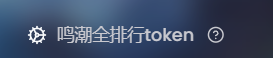
Select XutheringWavesUID in the plugin configuration, and fill in the token you obtained in the "Wuthering Waves Full Ranking Token" field.
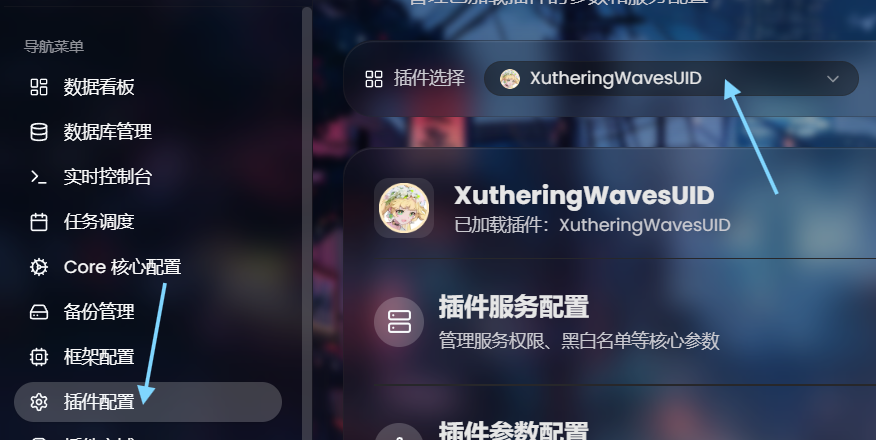
Scoring OCR Token:
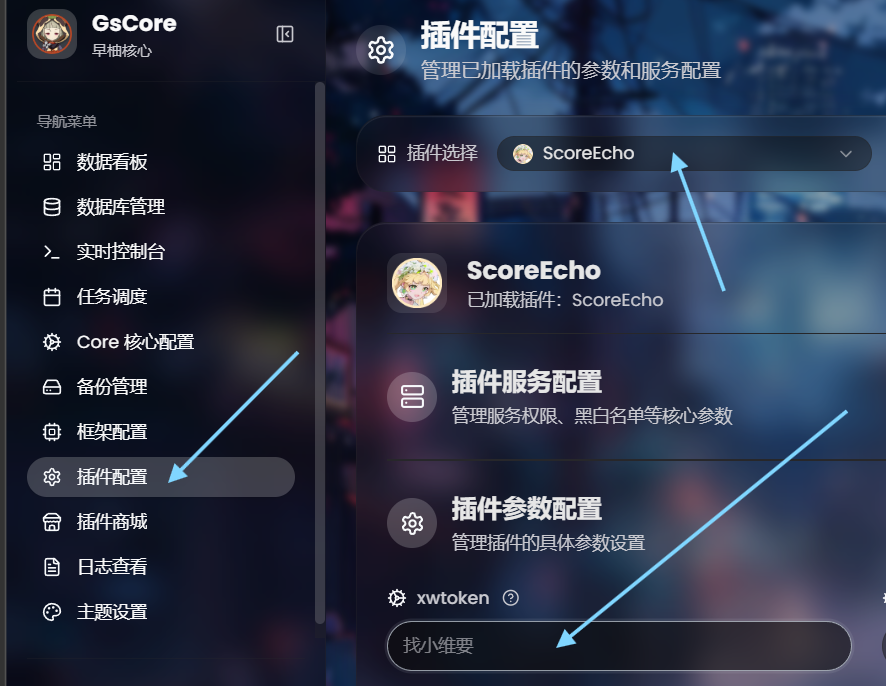
After installing the GsCore plugin ScoreEcho, select ScoreEcho in the plugin configuration, and fill in the token you obtained in the xwtoken field.
6-2 Installation and Runtime Issues
Q3: Rendering Failure
A:
Execute the following in the gsuid_core directory:
# Linux
source .venv/bin/activate && uv pip install playwright opencv-python fonttools pypinyin rapidfuzz && uv run playwright install chromium

# Windows
.venv\Scripts\activate; uv pip install playwright opencv-python fonttools pypinyin rapidfuzz; uv run playwright install chromium
Even if the Core has automatically installed the Python packages, you still need to